 ClerkBrain
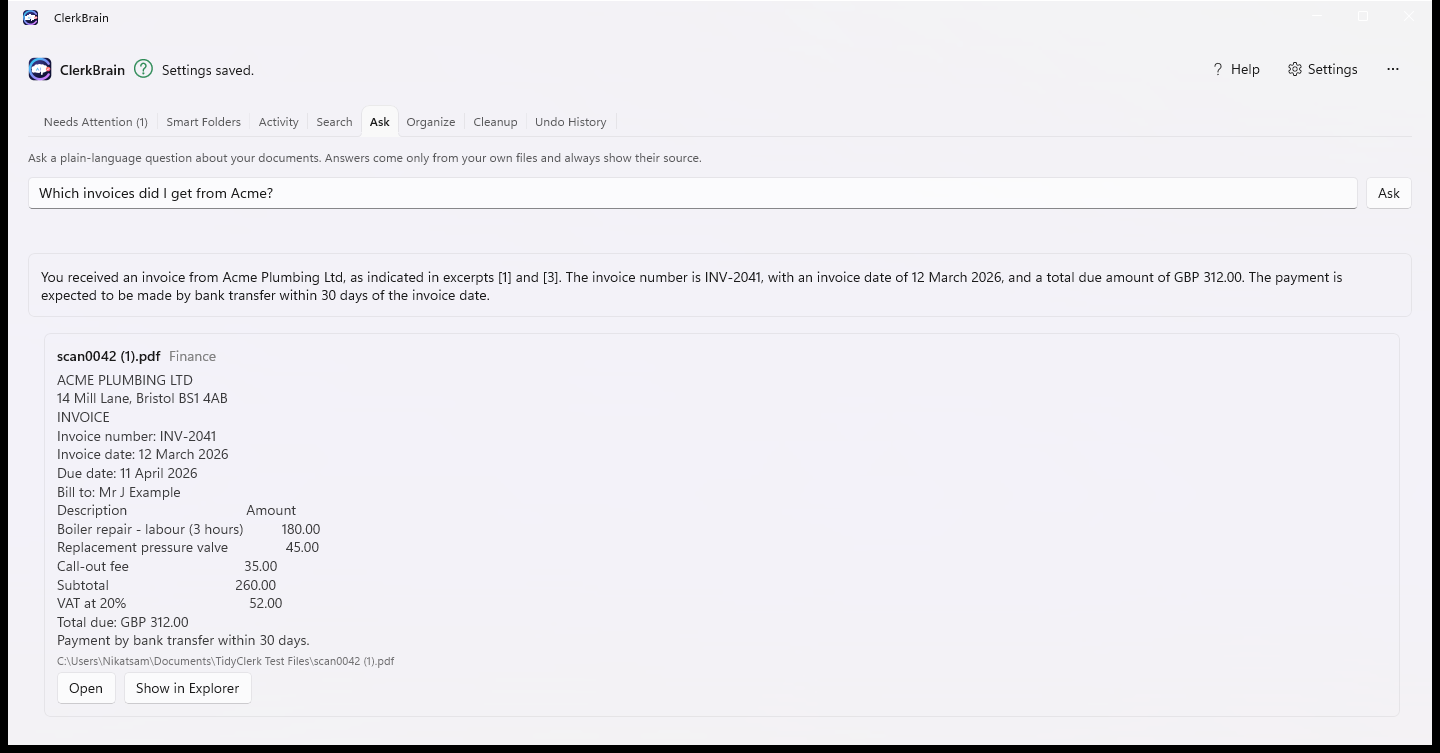
"What was that bill from March again?" Just ask.
A lot of "AI file search" quietly means your files pass through someone else's cloud. ClerkBrain's search and question-answering run on your own processor — the only thing that ever travels over the network is the one-time, optional download of the AI models themselves.
Reads, not just indexes
Every document's actual text is extracted — including scans and photos via on-device OCR — not just its file name and date.
Searches by meaning
A small local embedding model finds documents by what they're about, so "power bill" still finds an "electricity invoice."
Answers, with a source
A small local language model drafts an answer, and the exact document it came from is shown right alongside it — click to open and verify.
Says when it doesn't know
If nothing in your documents answers the question, ClerkBrain says so, instead of inventing something plausible-sounding.
Common questions
Can I ask my computer questions about files stored locally, without the cloud?
Yes. ClerkBrain runs a small language model directly on your PC. You can ask plain-English questions about your own documents and get an answer sourced from the matching file, with no file or question ever leaving your device.
How is this different from Windows Copilot's file search?
Windows Copilot's file search can run through cloud AI services depending on configuration, and Microsoft itself advises double-checking its answers. ClerkBrain's document reading and question-answering run entirely on your PC, and every answer is shown alongside the exact source document so you can verify it yourself.
Does ClerkBrain ever make up an answer that isn't in my documents?
No — it answers only from text it has actually read in your own documents, and shows the source file with every answer. If nothing in your documents answers the question, it says so.
Launching on the Microsoft Store soon
Check back for the live Store link.
⊞ Coming soon to the Microsoft Store