 ClerkBrain
From landfill back to a folder you can actually use
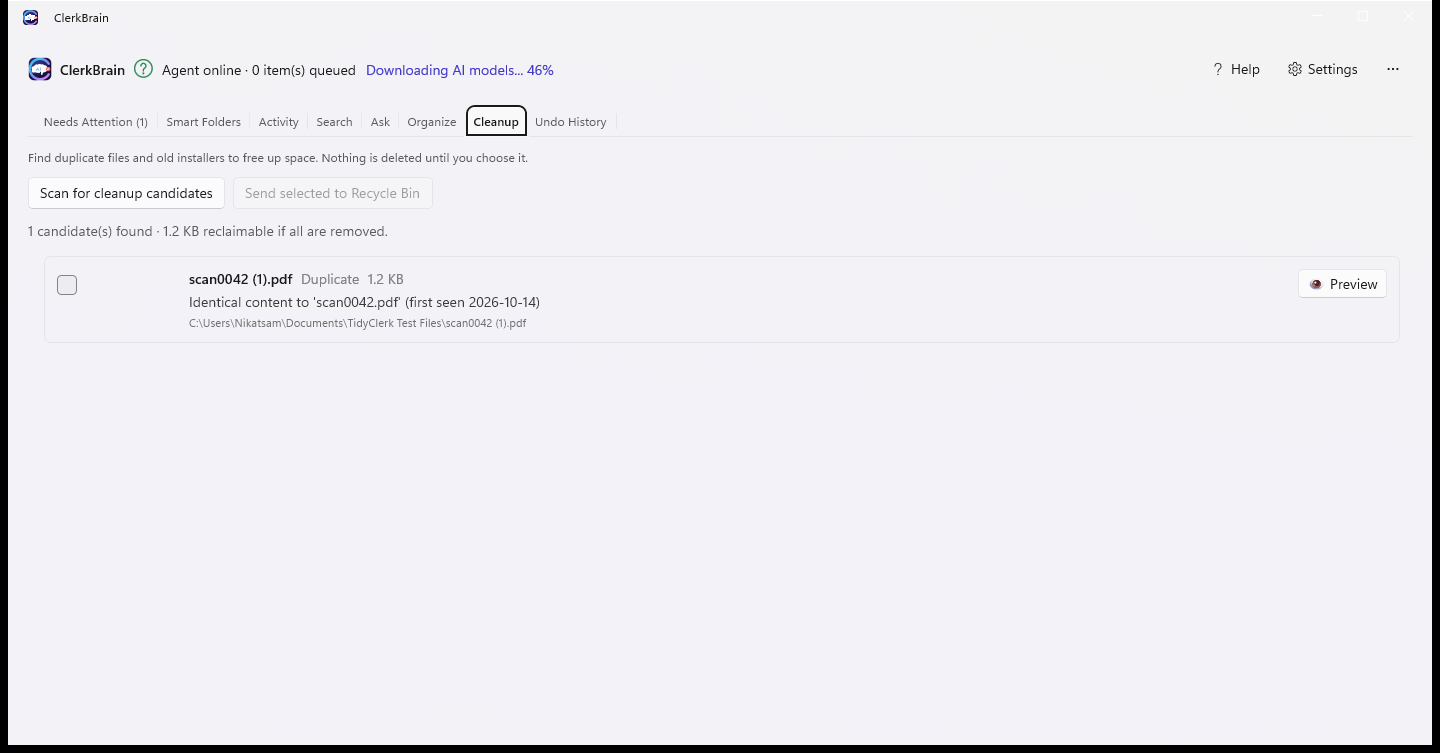
The same installer downloaded three times. The same PDF saved twice under different names. A quick scan finds the exact duplicates and stale leftovers piling up — you decide what goes, and nothing is ever permanently deleted without passing through the Recycle Bin first.
Exact matches only
Flags verified duplicate content, not a vague "looks similar" guess — so a decision to remove something is never based on an uncertain match.
Preview before you decide
See what a candidate actually is before choosing to remove it, right from the scan results.
Recycle Bin, not gone
Removed files land in the Windows Recycle Bin exactly like a normal delete — restore them the same way, any time.
Pairs with organizing
Clear the duplicates first, then let ClerkBrain suggest names and folders for what's left, with no duplicates competing for the same name.
Common questions
How do I clean up a Downloads folder that's turned into a landfill of old files?
ClerkBrain scans your Downloads folder for duplicate files and stale leftovers like old installers, shows you each candidate to preview, and only removes the ones you select — sending them to the Recycle Bin rather than deleting them outright.
Will an automated cleanup tool delete something I actually need?
ClerkBrain never deletes automatically. Every candidate is shown for review first, and anything removed lands in the Windows Recycle Bin, so it's recoverable the same way an ordinary accidental delete would be.
How does ClerkBrain decide two files are duplicates?
By exact content match, not a loose "looks similar" guess — the same file saved or downloaded more than once, even under a different file name.
Launching on the Microsoft Store soon
Check back for the live Store link.
⊞ Coming soon to the Microsoft Store